Choosing the right small laser cut machine can expand DIY capabilities from custom gifts to precise prototyping. This guide highlights five compact, user-friendly models designed for beginners and enthusiasts alike. Each entry covers core specs, materials, and real-world use cases to help you compare quickly and decide which machine fits your projects best.
| Product | Brand | Working Area | Power (mW) |
|---|---|---|---|
| Artilume T1 Laser Engraver | Artilume | 200×150 mm | 3000 |
| ACMER S1 Laser Engraver (3500 mW) | ACMER | 130×130 mm | 3500 |
| ACMER S1 Laser Engraver (6000 mW) | ACMER | 130×130 mm | 6000 |
| Carverall K15 Pro | Carverall | 200×300 mm | 5000 |
| WIZMAKER Wand MINI | WIZMAKER | 135×145 mm | 2500 |
Artilume T1 Laser Engraver Overview

The Artilume T1 is designed as a foldable, portable laser engraver with a 200×150 mm working area. It ships ready to use, with no complex setup, making it suitable for quick-start projects in homes, classrooms, or on-the-go workshops. Its 3W laser targets wood, leather, acrylic, coated metals, and more, enabling a wide range of personalized crafts from gifts to prototypes. The foldable design helps save desk space and supports on-site creativity where power or workspace is limited.
Key practicality involves ease of use and compact form. It emphasizes a beginner-friendly experience, from out-of-the-box calibration to straightforward operation. The device is well-suited for simple engraving tasks, small batches of custom items, and hobby projects that benefit from a portable setup with decent precision (0.01 mm-level positioning). For educators or hobbyists needing a quiet, low-maintenance machine, the T1 offers a capable starting point.
ACMER S1 Laser Engraver (3500 mW) at a Glance

The ACMER S1 with 3500 mW diode laser focuses on high-precision engraving within a 130×130 mm area. It emphasizes compatibility with AcmerTool software and other popular engraving programs, offering flexible workflows for hobbyists and professionals. The device delivers up to 10,000 mm/min engraving speed and 0.01 mm repeatable accuracy, making detailed patterns and text feasible on wood, acrylic, leather, and more. Its compact footprint makes it a practical choice for desktop setups and small studios.
What sets the S1 apart is its software ecosystem and fine-detail performance. The dual-worthiness of engraving and cutting supports a variety of materials, including thin plywood and plastics, which is valuable for crafts, prototypes, and small-batch products. For users who want dependable software support and accurate results without a steep learning curve, this model aligns well with steady precision work.
ACMER S1 Laser Engraver (6000 mW) Overview

This variant upgrades to 6000 mW, delivering higher power for deeper and faster engraving on a similar 130×130 mm workspace. It preserves the free AcmerTool software and supports broader material compatibility, including wood, acrylic, metal-oxide ceramics, and more, with the same 2 mm focal length and 0.01 mm repeatable accuracy. The 6000 mW model targets thicker materials and denser engravings, enabling stronger, more durable results for prototyping and professional projects within a compact desk setup.
Potential users include small businesses testing product ideas, students in STEM labs, and makers who require crisper lines and deeper cuts without moving to larger industrial machines. The balance between power, speed, and precise control makes this ACMER S1 variant a strong option for incremental upgrades or projects needing enhanced material capability while staying in a compact footprint.
Carverall K15 Pro: Precision In A Portable Package
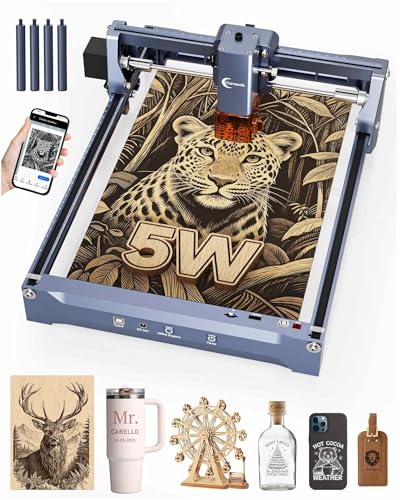
The Carverall K15 Pro emphasizes high accuracy and a larger working area of 200×300 mm, supporting intricate designs with professional flair. It delivers true 5W power, enabling engraving on over 100 surfaces and cutting through thicker materials like 6 mm wood and 3 mm acrylic. The device is touted as easy to assemble with six screws and no belts, simplifying setup and maintenance. Software compatibility with CutLabX, LightBurn, and LaserGRBL expands workflow options across Windows, Mac, and mobile ecosystems, making it adaptable for classrooms, studios, and small workshops.
With its balance of forceful output and a practical enclosure, the K15 Pro suits makers who want stronger performance without stepping up to larger CNC laser systems. The combination of a sizable work area, strong power, and broad software support makes it a versatile choice for jewelry, decor, or craft production where detail and throughput matter.
WIZMAKER Wand MINI 2.5W: Beginner-Friendly and Compact

The WIZMAKER Wand MINI focuses on simplicity and quick-start usability for beginners. Its 2.5W diode laser provides a 0.04 mm spot with a 135×145 mm working area, one of the larger portable options in its class. The device ships fully preassembled, eliminating belt and screw adjustments for immediate use. It supports a wide range of materials, including wood, acrylic, leather, fabric, and more, making it ideal for DIY decor, name tags, coasters, and classroom demonstrations. A cautionary note for metal is included in product messaging, guiding users toward appropriate models for metal work.
For educators, hobbyists, or casual crafters who want a plug-and-play experience with reliable performance, the Wand MINI offers quick results with minimal setup. Its emphasis on safety and straightforward operation makes it accessible for home studios and classroom demonstrations, while still enabling meaningful, small-scale projects.
Buying Guide: Key Purchase Considerations
- Power and material capability: Higher mW (or W) power supports deeper cuts and faster engraving on thicker materials. For metals or coated surfaces, look for models with appropriate specs and safety features.
- Working area vs desk space: Smaller desks benefit from compact footprints, but ensure the working area fits your typical project size. Larger areas enable more complex designs without frequent material changes.
- Software and workflow: Native software and compatibility with popular programs (LightBurn, LaserGRBL, AcmerTool) impact ease of use. Look for out-of-the-box calibration and documented updates.
- Portability and setup: Foldable or preassembled units save space and time. Consider how often you’ll move the machine or use it in different spaces.
- Safety and education features: Safety glasses, protective enclosures, and clear material guidance help reduce risk in homes and classrooms. Educational kits and STEM-ready features add value for schools.
- Repairability and support: Availability of spare parts, replacement components, and responsive customer support can extend the life of a modest investment.
- Future-proofing: If you anticipate scaling up or tackling more projects, consider models with stronger power, broader material compatibility, and robust software ecosystems.
In summary, small laser cut machines vary from ultra-portable, easy-start options to higher-powered units that can tackle thicker materials and more demanding tasks. When choosing, align capabilities with typical project types, workspace constraints, and software preferences. The five models highlighted here provide a spectrum of entry points, balancing portability, precision, and versatility for American makers, hobbyists, and small businesses.